TMS Check App: Check Road Traffic Offence(RTOC) Anytime

 The TMS Check app is an official mobile application which enables Tanzanian   citizens to manage and verify traffic offenses, vehicle fines, license status, and other road compliance requirements directly from their smartphones. It reduces the chances of missing fines and payments that are often paid late as well as reduces the physical visits to the police stations or TRA office. 

What is TMS Check App? 

TMS Check App is a mobile application that enables users to easily and quickly access information such as traffic offenses or fines issued during TMS police check, driving license validity, and vehicle insurance status. The TMS Check App is officially endorsed by the Tanzania Police Force. It provides a fast, convenient, and reliable method for citizens to perform check on traffic offenses, validity of driving license, and insurance covering the vehicle from their Android devices. 

tms check app

Features of TMS Check App  

Traffic Fine Check

Check if your vehicle has pending traffic fines or penalties.  View detailed information such as: 

  • Offense type
  • Date and location of the offense
  • Fine amount
  • Status (Paid/ Pending)

Vehicle Insurance and Road License Status

  • Confirm if your vehicle has road license and check if the insurance is valid. 
  • Check expiration dates and set reminders for renewals.

Driving License Verification  

  • Confirm the current status and validity of your driving license.  
  • Check class, issuance date, and expiry.  

Ticket or Reference Check

Search by specific control number, reference of offense or ticket number to view payment or processing status.  

How to Download and Install the TMS Check App  

In order to use the app, follow these steps:  

Step 1: Download the App  

  • Open Google Play Store  
  • In the search bar, enter Loss Report and Traffic Check 
  • Click Install  
  • After installation, open the app  

Step 2: Open the App  

  • Go to the app on your mobile device

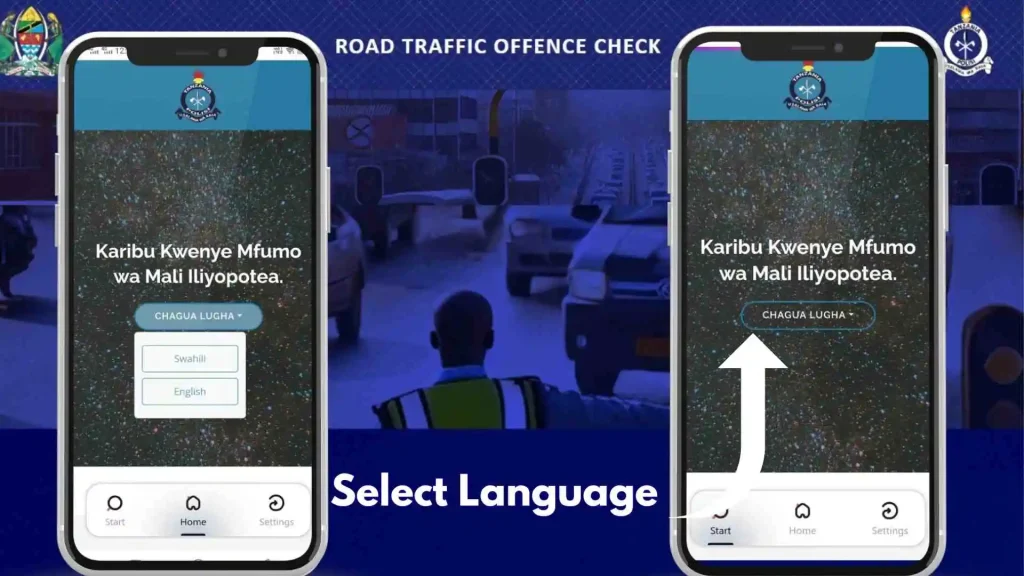
Step3: Choose Language

  • Select language you would like to go with:
  • English 
  • Swahili
select language

Step 4: Select Service 

  • Select the service you would like to use for:
  • Loss Report
  • PCC
  • Search Found Property
  • TMS Check ( to check traffic or license fine issued during TMS police check)

How To Perform TMS Check APP?

To check pending offenses through loss report and traffic check app follow the steps mentioned below: 

Step 1: Click On TMS Check

  • If you are looking to check your pending traffic offenses then scroll down and tap on TMS Check. 

Step 2: TMS Check Methods

Just like the official TMS check website Loss Report & Traffic Check app also offer checking pending road offenses by:

  • Search by Registration Number
  • Search by Driving License Number
  • Search By Reference Number 

Step 3: Select TMS Check Method

  • From the given 3 methods select one method which is convenient for you. 
tms check methods

Step 4: Perform TMS Check

  • First tap on either search by:
  • Registration Number
  • Driving License
  • Reference Number
  • Then in the search bar enter vehicle’s registration number or driving license number or reference number if you have one.
  • Click on search and wait for results to show up.

Step 5: Check Pending TMS Traffic Offense

  • Check your pending offense along with pending offense also check:
  • Type of offense you got fined (so, you next time you can avoid that offense)
  • Deadline (to avoid penalty)
  • License Number (in case you rent out your vehicle)
offense

Pay Traffic Fines

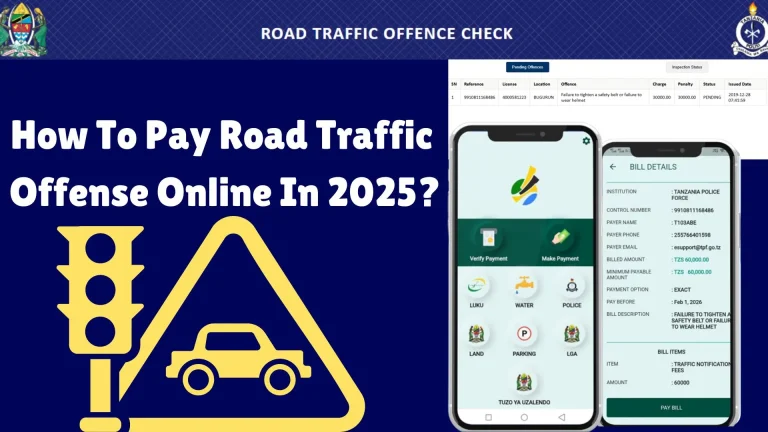
Now after checking the type of offense and fine amount the next step is to pay the fine on time to avoid penalty. To pay the fine you would need to download and install another application GePG to pay fines online if you don’t want to stand in the long lines outside the bank. To make traffic fine payments:

  • Download GePG
  • Open App click on Police or Parking.
  • Search for offense with plate number or driving license.
  • You can also use control number (reference number) to search for fine.
  • Then click on pay and pay by using your preferred Mobile money number. 
  • After you receive confirmation message download receipt for future use. 
check bill details

Why Use the TMS Check App?  

  • Easy and convenient way to check traffic fines.  
  • Eliminates the need to go to the police station.  
  • Averts late fines and penalties.  
  • Data is officially provided by the Tanzanian Police Traffic Management System.  

Conclusion  

Conclusion


The TMS Check App changes how drivers interact with the police system in Tanzania. With a few taps on your mobile device, you can check fines, confirm the validity of your licenses, and be kept up to date without stepping outside your home.
Frequently Asked Questions

The TMS Check App allows users in Tanzania to check traffic fines, insurance status, road license status, and driving license information. It also enables payments via mobile money services.  

Yes. The downloads and usage of the app comes at no charge. However, if you have an outstanding traffic fine, you have to settle your payments using the control number provided.  

Currently, the app is only restricted to Android devices. An official version for iOS/iPhone has not been released.  

Yes, the app is accurate as it fetches data from the Tanzania Police Traffic Management System which is live data, hence current and reliable.

Similar Posts

Leave a Reply

Your email address will not be published. Required fields are marked *